JUST : A Simple command Runner
{% raw %}
As a developer, i usually want to run some set of commands to
execute/run the application. Like building and running docker container
or setting some environment variables before running application or
setting up the development environment like activating envs, running
db’s, opening vs_code like that.We can solve these using, alias command; but i need something more friendly with a text file.
Solution
While attending one of the weekend https://ilugc.in/ talks, Sibi K was discussing on one open source tool. JUST.
Just is a handy way to save and run project-specific commands. Commands are stored in a file called justfile or Justfile with syntax inspired by make:
Reference: https://just.systems/man/en/chapter_20.html
Official Website: just.systems
Official Documentation: just.systems/man/en
Git Reposity: github.com/casey/just
Examples: github.com/casey/just/tree/master/examples
How it works:
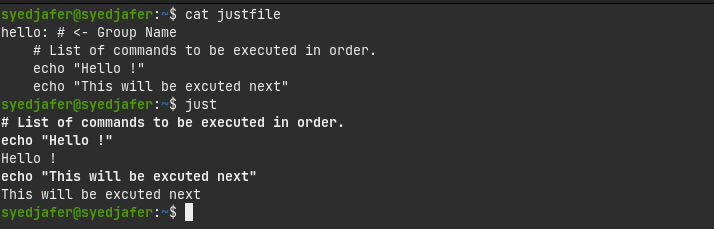
- We just need to create a file named
justfileorJustFile. - Then we need to add command(s) in a groupwise manner under a name, as given below.
hello: # <- Group Name # List of commands to be executed in order. echo "Hello !" echo "This will be executed next"
- Execute the file using
just.
Some cool features
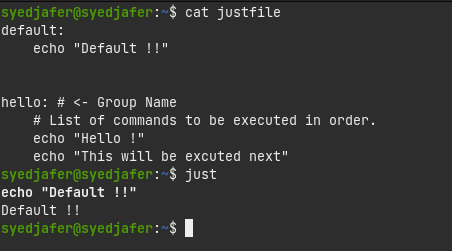
1. We can have a default group, which would be executed when we aren’t specifying the group name.
default: echo "Default !!"hello: # <- Group Name # List of commands to be executed in order. echo "Hello !" echo "This will be executed next"
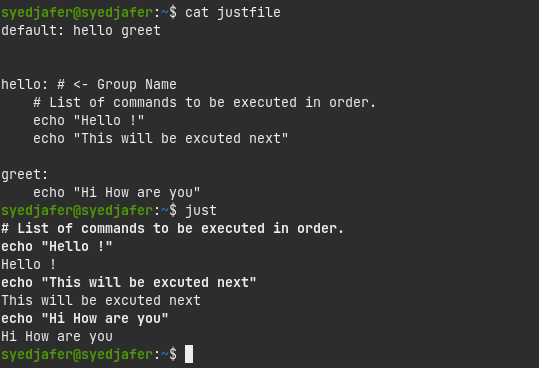
2. Each group is called as recipe’s. We can have multiple recipe’s name in the default recipe to execute them in order.
default: hello greethello: # <- Group Name # List of commands to be executed in order. echo "Hello !" echo "This will be excuted next"greet: echo "Hi How are you"
3. We can also use dotenv files with justfile.
.env
# a comment, will be ignoredPOSTGRES=localhost:6379PORT=5004
justfile
set dotenv-loadserve: echo "Starting the server with database $POSTGRES on port $PORT"

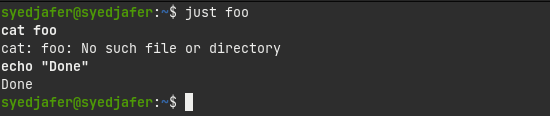
4. Usually when an error happens in a sequence of commands, the next commands will not run. But with justfile we can ignore the errors using hypen as a prefix (-cat).
foo: -cat foo echo "Done"
5. We can also use conditional expressions with just.
6. Changing variable values from command line itself.
7. Remember that each line will be executed in a fresh shell, so if you are changing directory in a line, it won’t affect the other line.
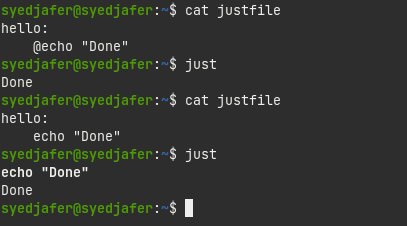
8. By using @ symbol it won’t echo the commands that we wrote.
hello: @echo "Done"
{% endraw %}